.svg)


.svg)

Here's the question your CFO is asking: Did we make money from LinkedIn?
A report containing your high impressions and CTR is not enough to answer that question. If you can't connect your LinkedIn spend to real pipeline, your next budget is at risk of being cut, and you, as a marketer, are not receiving the credit you deserve.
LinkedIn revenue attribution isn’t a nice-to-have. It’s the difference between a marketing team that can defend its budget and one that can’t. This article is the step-by-step guide to building yours.
The Gap Between LinkedIn Metrics and Revenue Reality
It's not that marketers aren't tracking performance. It's that the metrics LinkedIn surfaces by default were never designed to answer the questions leadership is actually asking.
Vanity Metrics vs. Revenue Metrics
CTR tells you how compelling your creativity is. CPL tells you how efficiently you're generating leads. Impressions tell you how many times your ad appeared on a screen. None of them tells you whether a deal has closed.
That's the core distinction between activity metrics and revenue metrics. Activity metrics measure the campaign. Revenue metrics measure the business outcome. LinkedIn revenue attribution is about the latter, specifically, which ads influenced the pipeline that converted to closed-won revenue.
Answering that question requires connecting your ad interaction data to what's actually happening in your CRM. LinkedIn Campaign Manager, on its own, cannot make that connection.
Why LinkedIn's Conversion Tracking Isn't Revenue Attribution
LinkedIn conversion tracking measures form fills and page visits, not pipeline or revenue. A "conversion" in LinkedIn's dashboard might be a free trial that never converted, or a lead sales disqualified on the first call. Revenue attribution requires connecting that conversion to what happened next in the CRM.
Here's a scenario that plays out constantly in B2B marketing teams: LinkedIn shows a campaign performing well. CPL is down, conversion volume is up, and the account team is pleased. Then someone asks sales how those leads are tracking. Silence. Or worse, a response along the lines of: "Those leads? We stopped working those weeks ago."
The campaign was optimizing toward a metric that had no relationship to revenue. LinkedIn didn't know that. It was doing exactly what it's designed to do: report on activity within its own walls. But its walls end at the click.
What happens after the click, the sales call, the qualification, is tracked somewhere else entirely. It's only by connecting those two systems that you get a picture worth making decisions from. When you figure this out as a marketer, you stop reporting on CPL as a primary success metric and start reporting on cost-per-pipeline and cost-per-revenue.
The Attribution Window Problem
If a deal closes 6 months after a LinkedIn touchpoint, that deal is invisible to LinkedIn's native reporting. That's not a minor error, it's potentially your most valuable customers being written off as organic or direct.
The attribution window problem is a function of how LinkedIn is built, not a bug you can report. The platform tracks activity within a defined window: 30 days for views, 90 days for clicks, and attributes conversions that occur within that window to the relevant campaign. Anything outside it is beyond LinkedIn's visibility by design.
For high-velocity, low-ACV products, that window is probably adequate. A $49 SaaS subscription that converts within a month is well-served by 30-day attribution. But for enterprise products with 3 to 9 month sales cycles, the window excludes the majority of revenue LinkedIn may be influencing. The deals that close fast are likely not your largest deals. The attribution model is measuring the smaller part of your business more accurately than the larger part.
The fix is straightforward in concept: track LinkedIn touchpoints in your CRM at the lead level, preserve that data through the full deal lifecycle, and measure closed revenue against the original source. The window LinkedIn uses to report internally becomes irrelevant once you own the data yourself.
What Tracking LinkedIn Ad Revenue Actually Looks Like
So if LinkedIn's native reporting can't close the loop, what does closing the loop actually look like? Not in theory. In practice, with real systems and real data.
The Core Data Flow
Revenue attribution is not a tool you buy. It is a data chain you build. Every stage in that chain has to pass clean information to the next one, and every break in the chain creates a gap that compounds downstream. For LinkedIn specifically, the chain looks like this: impression or click, UTM-tagged landing page, form fill or tracked visit, CRM contact created, deal opened, deal closed, LinkedIn touchpoint credited. Six handoffs. Six places where attribution can silently fail.
The LinkedIn touchpoint. This is where the chain starts. A prospect sees an ad or clicks on it. LinkedIn records that event internally, but that record stays inside LinkedIn. For it to mean anything downstream, the click has to carry identifying information into your environment. That information lives in the UTM parameters appended to the destination URL. If the URL has no UTMs, or if UTMs are inconsistently applied across campaigns, the chain breaks before it starts.
The landing page. UTMs arrive at the landing page as URL parameters. Your analytics platform, GA4, Segment, or whatever you're running, needs to read and store those parameters before the session ends. If the landing page redirects before the parameters are captured, or if the page isn't instrumented correctly, the source data is lost at step two.
The form fill or tracked visit. When a prospect converts, the UTM data sitting in their session needs to be transferred into the form submission. Most form tools don't do this automatically. It requires hidden fields mapped to UTM parameters, populated via JavaScript before submission. If those hidden fields aren't built in, the CRM record gets created with no source data attached. The lead exists, where it came from does not.
The CRM contact. Assuming source data survived the form fill, it now needs to land correctly on the CRM record and stay there. Two failure modes are common here. First, the CRM overwrites the original source when a contact re-engages, replacing first-touch LinkedIn data with the channel that most recently touched them. Second, the lead source field isn't standardized, so LinkedIn traffic gets logged as "linkedin," "LinkedIn Ads," "LI," and "paid social" by different reps, making it impossible to aggregate cleanly.
The deal. A contact becoming a deal is another handoff. The source data on the contact record must carry over to the opportunity record. In some CRM configurations, it does this automatically. In others, it requires a mapped field or a manual process that sales doesn't consistently follow. If the deal record doesn't inherit LinkedIn as the original source, the contact's history becomes irrelevant to revenue reporting.
The closed deal. This is where attribution either pays off or doesn't. When a deal closes, your reporting needs to be able to look back at the original source on that deal record and credit LinkedIn. If every prior step worked, this is a straightforward query. If any prior step fails, the deal either gets credited to the wrong channel or sits in an unknown bucket, slowly inflating your direct traffic numbers.
The chain isn't complicated. But it requires every team that touches it, marketing, web, sales ops, and sales, to do their part consistently. Most attribution failures aren't caused by missing technology. They're caused by one link in this chain being quietly broken for months while reporting continues as normal.
Influenced Revenue vs. Direct Revenue
Most B2B deals don't have a single source. They have a sequence. A prospect sees a LinkedIn ad, reads a blog post a week later, gets an outbound email from a sales rep, attends a webinar, and then books a demo through a Google search. Which channel gets credit? Under last-touch attribution, Google gets it. Under first-touch, LinkedIn gets it. Under either model, no one gets an accurate picture of what actually drove the deal.
This is the difference between direct attribution and influenced attribution, and it matters more as sales cycles lengthen.
Direct attribution assigns a deal to a single source either last click or first click. It's simple to implement and easy to report on. It's also wrong most of the time in enterprise B2B, because it forces a multi-touchpoint journey into a single-cause explanation. The channel that happened to touch the prospect closest to signing gets full credit. Every channel that contributed before that gets none.
Influenced attribution takes a different approach. Instead of asking which channel closed the deal, it asks which channels appeared in the buyer journey before the deal closed. A deal is counted as LinkedIn-influenced if LinkedIn appeared anywhere in that journey, regardless of whether it was first touch, last touch, or somewhere in the middle. The metric this produces is influenced revenue: the total closed revenue from deals where LinkedIn played a role.
Influenced Revenue Attribution models, like the one DemandSense uses, credits LinkedIn for every deal in which it appeared in the buyer journey, using a 320-day window. That window matters because it reflects how long enterprise deals actually take, not how long a platform's default reporting window assumes they take. A prospect who engaged with a LinkedIn ad 10 months before signing still counts. Under LinkedIn's native 90-day window, that deal was written off months before it closed.
The tradeoff with influenced attribution is that it can overcount. If LinkedIn touched every deal because your retargeting reaches your entire CRM, influenced revenue becomes a large number that doesn't mean much. The model works best when LinkedIn touchpoints are specific enough to signal genuine intent, yet not so broad as to apply to every deal by default. The goal is a number that reflects real contribution, not a number inflated by ubiquitous retargeting.
Multi-Touch Models That Work for B2B
Before choosing an attribution model, it helps to be honest about what attribution models actually do. They don't reveal ground truth about what caused a deal to close. They apply a framework for distributing credit across a sequence of events. The framework you choose determines what your data appears to say, which means the choice matters.
Three models are commonly used in B2B contexts, and they produce meaningfully different pictures of LinkedIn's contribution.
Linear attribution spreads credit evenly. Every touch in the journey gets the same weight. A LinkedIn ad from seven months ago and a sales follow-up email from last Tuesday both contribute equally to the closed deal.
Time-decay attribution slopes credit toward the close. The closer a touchpoint occurred to the deal signing, the more credit it received. LinkedIn tends to lose under this model because its highest-value work, building brand familiarity with buyers who aren't yet in the market, happens early. By the time those buyers are close to signing, more recent touches accumulate the credit. Time decay is a reasonable model for high-velocity sales. For long-cycle B2B, it undervalues channels that operate at the top of the funnel.
U-shaped attribution anchors credit at two endpoints: first touch and conversion event. Each typically receives around 40 percent of the credit, with the remaining 20 percent distributed across the middle. This model treats the initial contact and the commitment to evaluate as the two most significant events in the journey. LinkedIn benefits here when it generates first touch, which is often the case for awareness-stage campaigns.
Start with linear. It's the most honest model to use when attribution infrastructure is new, and touchpoint data is still incomplete. It won't tell you everything, but it won't encode wrong assumptions either. Once you have enough closed deals with full touchpoint histories, you'll have real data to test whether a different model tells a more accurate story or just a more convenient one.
Building a LinkedIn Ad Revenue Report
Once the data chain is intact — UTMs applied, CRM connected, deal stages mapped — the report is where it pays off. DemandSense’s Revenue Attribution module pulls LinkedIn ad data and CRM deal data into one view, organized around the questions leadership actually asks.
Overview: The Executive Summary
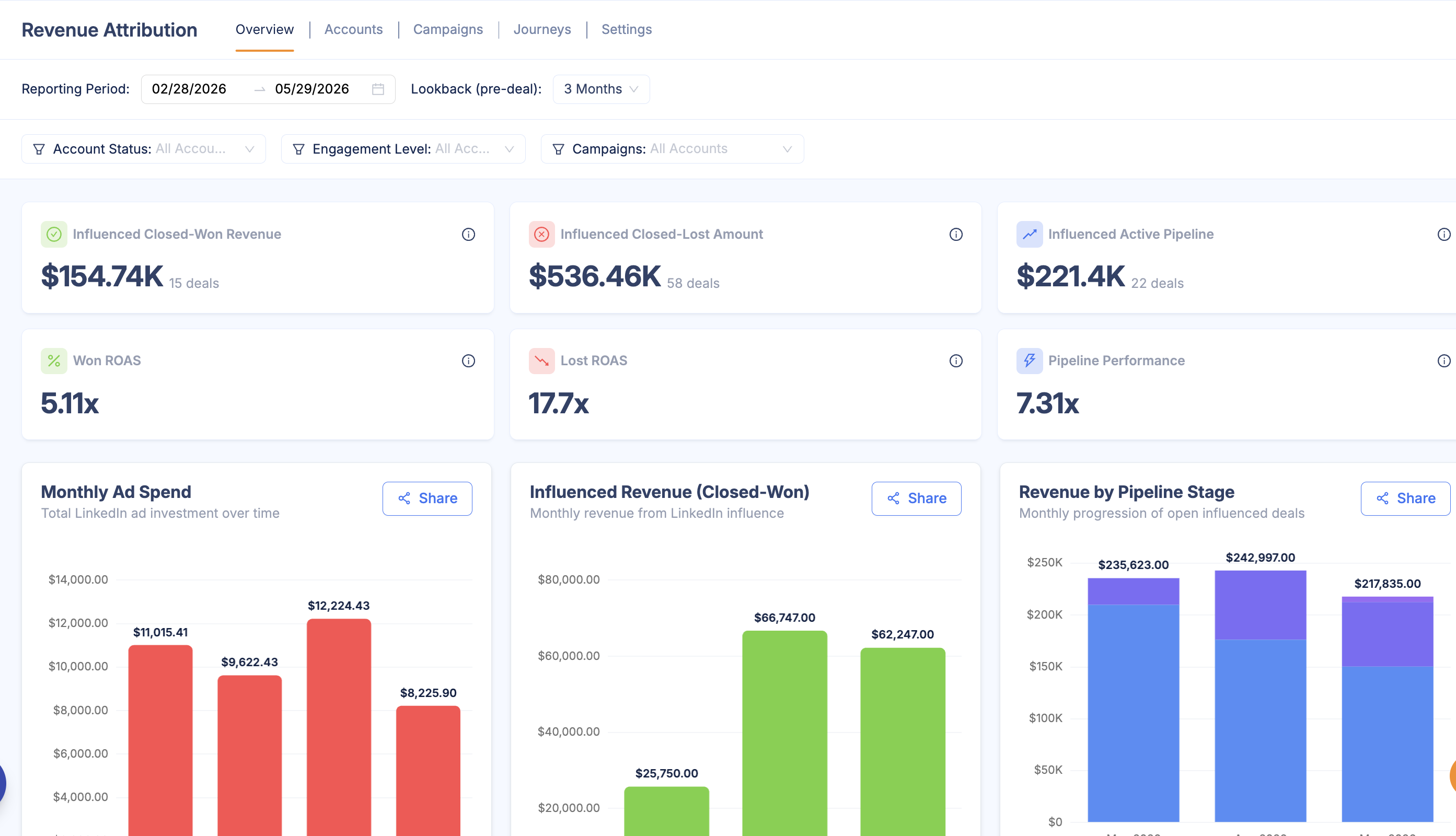
The Overview tab answers the core question immediately. Six KPI cards surface Influenced Closed-Won Revenue, Influenced Active Pipeline, and Won ROAS — calculated as total closed-won revenue from influenced accounts divided by ad spend. Below the KPIs, charts break down performance by industry, company headcount, and geography, so you can see not just whether LinkedIn is working, but which segments it’s working for.
Accounts: Every Influenced Account in One Place
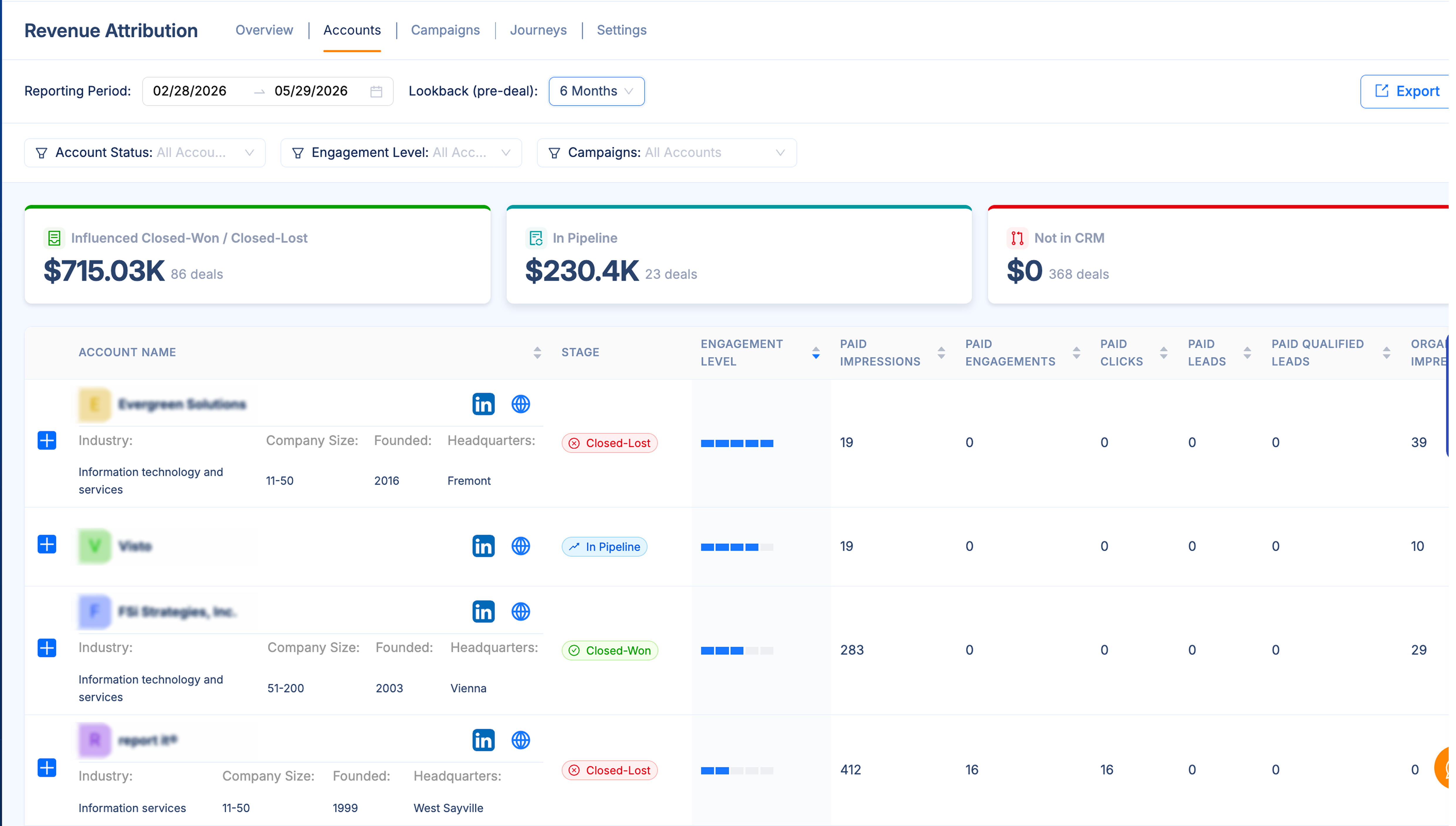
The Accounts tab lists every company your LinkedIn activity touched before a deal was created — with CRM stage, engagement level, ad spend, and ROI for closed deals. Click any row to open the full buyer journey: the complete sequence of impressions, engagements, website visits, and CRM events from first touch to close. This is where the data chain pays off. You can trace exactly which LinkedIn activity preceded each deal.
Campaigns: Which Ones Actually Drive Revenue
The Campaigns tab flips the view. Instead of starting with accounts, it starts with your campaigns and shows which ones influenced pipeline and revenue — not just which ones generated clicks. Expand any campaign row to see the specific deals it influenced, with deal size, stage, and sales cycle length.
Settings: Configure Attribution Before Reading the Numbers

Before reading any of these numbers, check how attribution is configured in Settings. DemandSense offers three preset models — Awareness, Engagement, and Intent — based on which signals you want to credit: impressions, interactions, or clicks and site visits. You can also build a custom model with your own thresholds. The lookback window is configurable here too, and for most B2B teams that’s the more important decision. A window that’s too short will write off your longest — and often largest — deals before they close.
Common Mistakes That Corrupt LinkedIn Ad Revenue Tracking
Getting attribution right is mostly about avoiding a predictable set of errors. Each one on this list will quietly undermine your numbers without announcing itself, which is what makes them worth knowing in advance.
- No UTM Discipline
Missing or inconsistent UTMs are the most common source of corrupted attribution data. When a prospect clicks a LinkedIn ad and lands on an untagged URL, that session gets logged as direct traffic. Do this enough times and your direct channel looks artificially strong while LinkedIn looks artificially weak. The fix is a UTM naming convention that everyone follows, applied consistently across every LinkedIn asset before anything goes live.
- Using LinkedIn's Default Attribution Window
LinkedIn's platform defaults to a 30-day click window (even though you can extend it up to a year now, that’s something you should set manually in settings). In B2B, where sales cycles routinely run three to twelve months, that window captures only a fraction of the deals LinkedIn influenced. If you're measuring performance inside LinkedIn's native reporting, you're measuring a slice. Move attribution into a tool that can track touchpoints across the full sales cycle.
- Counting Conversions Instead of the Pipeline
Form fills are not revenue. A whitepaper download is not a sales-qualified lead. When marketers optimize for conversion volume and report those numbers to leadership, they're measuring activity, not outcomes. The goal is to connect LinkedIn touchpoints to pipeline value and closed revenue, not to maximize the number of assets downloaded by people who will never buy.
- Not Looping in Sales
LinkedIn touchpoints that don't make it into the CRM are invisible to any attribution model. If sales reps aren't logging LinkedIn interactions, or if the CRM isn't capturing LinkedIn as a source, you're working with an incomplete picture. Attribution quality is a sales and marketing alignment problem as much as a technical one. Get agreement on what gets logged, where, and by whom.
- Over-Attributing
The opposite mistake is crediting LinkedIn for deals where it played no meaningful role. If a prospect had one ad impression eighteen months before signing, counting that deal as LinkedIn-influenced inflates your numbers and eventually undermines trust in the model. Set a reasonable threshold for what counts as a meaningful touchpoint, document it, and apply it consistently.
Each of these mistakes is fixable. None of them requires a new tool or a large budget. They require process and someone willing to audit what's actually being tracked before the next reporting cycle.
Wrapping Up...
LinkedIn revenue attribution comes down to one foundational requirement: connecting three systems that most marketing teams treat as separate. Ad data, website analytics, and CRM records need to talk to each other. Without that connection, you're working with fragments. With it, you can trace a prospect's journey from first LinkedIn impression to closed deal and put a number on what that journey contributed.