

.svg)


.svg)
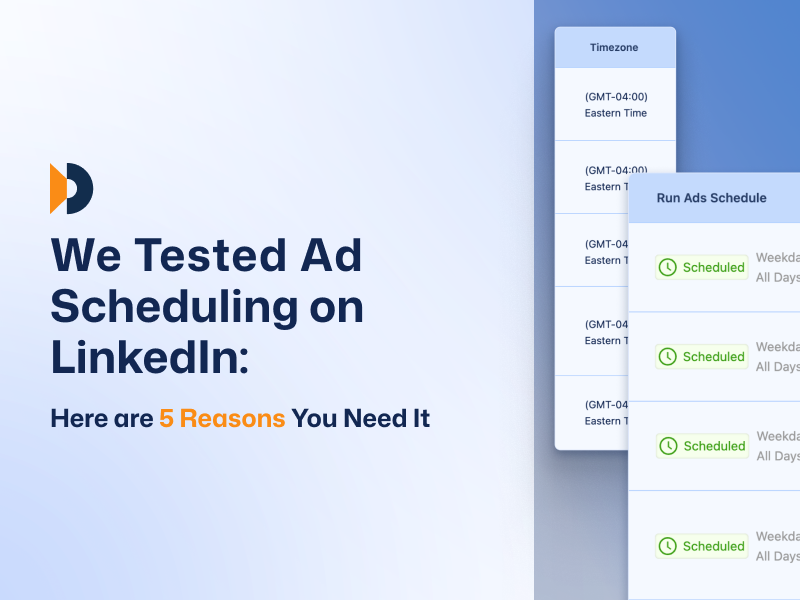
LinkedIn gives you delivery settings. Start date, end date, daily budget, lifetime budget. You can turn campaigns on and off manually. You can adjust bids.
But that's about it. There's no native hourly dayparting. No automatic scheduling for specific days of the week. No way to concentrate delivery during windows when your audience is actually engaged without manually toggling campaigns on and off every day.
Most B2B advertisers know this. They've looked for the scheduling options. They've asked their reps about it. The answer is always the same: LinkedIn doesn't offer that level of control.
Which raises the question: is there a reason LinkedIn never built this, or is it just a gap they haven't prioritized?
We ran a controlled experiment to find out. Does limiting ad delivery to specific hours actually improve performance, or does it just create more problems than it solves?
Here's what happened.
The Setup
Two B2B campaigns. Both tested the same question: does using a LinkedIn scheduling tool to concentrate ad delivery during peak engagement windows improve performance, or does it just reduce reach?
- Control: Standard 24/7 delivery
- Test: Manual bid scheduling (limited to business hours, Monday-Thursday)
- Same budget, same audience, same creative across both variants
- Tracked: CTR, CPC, CPM, reach, impressions, engagement, conversions
- Duration: 3+ weeks per variant
The manual scheduling setup concentrated the budget during proven high-activity windows—roughly 7am to 6pm on weekdays—avoiding evenings, weekends, and early mornings when B2B engagement typically drops.
5 Things That Actually Got Better With LinkedIn Ad Scheduling
The data was clear. When you limit delivery to windows where your audience is actually paying attention, performance changes. Here's what improved and what it means if you're managing LinkedIn campaigns right now.
1. You Reach More People With Less Wasted Delivery
Impressions increased 38%. Reach expanded 26.9%.
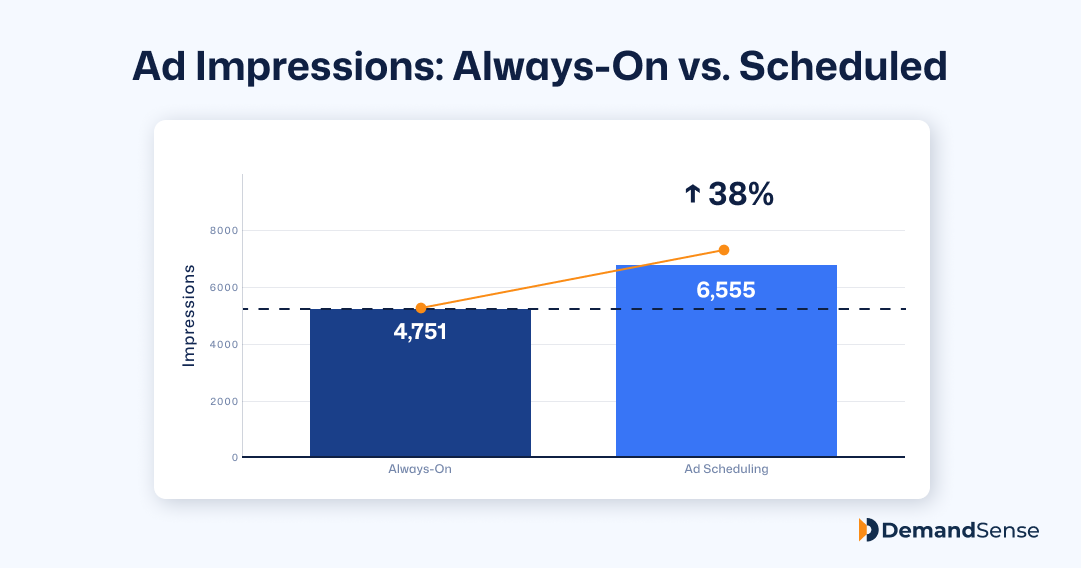
This seems backwards: how do you reach more people by running fewer hours? But it makes sense when you think about auction dynamics. When your ads show up during high-activity windows, you're winning more competitive auctions because your relevance scores are higher.
LinkedIn's algorithm rewards ads that get engagement, and engagement happens when people are actually online.
Translation: you're not just concentrating the same delivery into fewer hours. You're getting more total exposure because your ads perform better when they run.
2. More People Actually Click
CTR jumped from 1.58% to 2.00%.
That's not a marginal lift. It's the difference between 158 clicks per 10,000 impressions and 200 clicks. When your ad shows up at 10am on a Tuesday instead of 11pm on a Saturday, people stop scrolling and actually engage with it.
For B2B campaigns where you're paying ~$15 per click, this efficiency gains compounds fast. You're getting 26% more traffic from the same impression volume just by controlling when ads run.
3. You Pay Less Per Click
CPC dropped from $5.49 to $5.23.
Not a massive difference on paper, but when you're running campaigns at any real scale, those pennies add up fast. Higher CTR signals to LinkedIn that your ads are relevant, which improves your quality score and lowers what you pay in the auction. Better engagement means cheaper clicks.
4. Engagement Quality Improves Across the Board
Total engagements increased 70%, from 88 to 150 touchpoints.
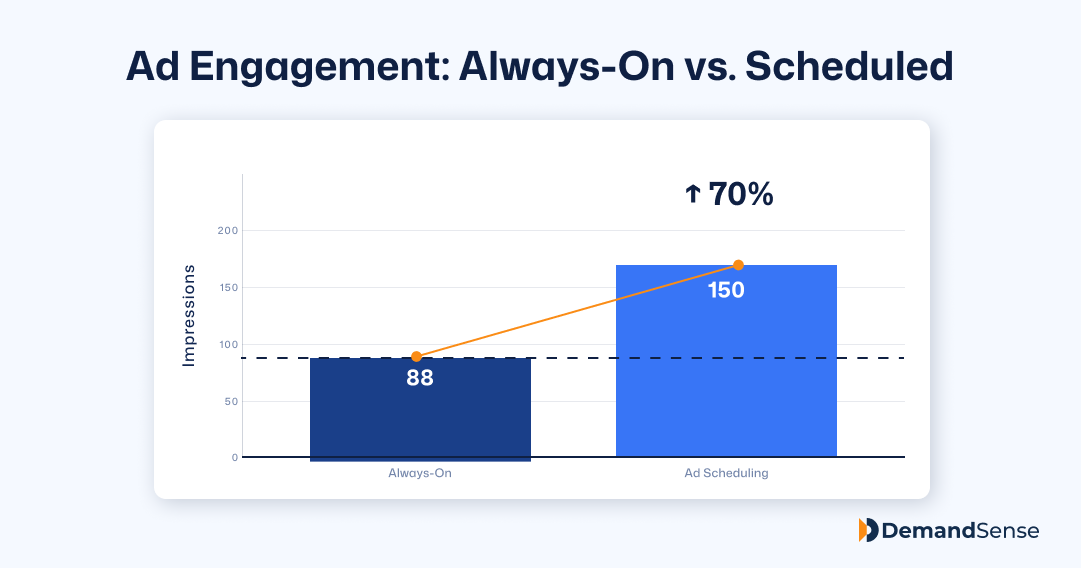
We're talking about likes, comments, shares, and profile clicks. The kind of engagement that signals people actually processed the content instead of scrolling past it. For thought leadership campaigns where you're trying to build credibility and visibility, this matters more than raw impression volume.
Social proof compounds. When your content gets meaningful engagement during peak hours, it stays visible longer in feeds and reaches more people organically.
5. Video Performance Gets Better
Views increased 39%. Completion rates improved at every stage, whether someone watched just a few seconds or made it all the way to the end.
Even the warmest segments of your audience (the ones who typically watch until the last frame) stick around longer, which is a strong signal that your audience is genuinely engaged, not just passively scrolling.
For video ads where you're paying per view or optimizing for brand awareness, completion rate directly affects how well your message lands. Higher completion = more people actually hearing your full pitch.
Is LinkedIn Campaign Scheduler “The” Answer?
We're not going to pretend LinkedIn ad scheduling is all upside. There's a real cost.
CPM increased from .70 to .52, up 20.5%.
When you limit delivery to peak hours, you're competing with every other advertiser targeting those same windows. More competition in the auction means higher costs per thousand impressions. That's just how it works.
The other thing worth knowing: results aren't uniform. In one test, the scheduled variant saw reduced reach and lower engagement totals. Not because the LinkedIn schedule campaign strategy failed, but because that campaign's audience didn't have a clear peak-window advantage to exploit.
So, what’s the takeaway here?
Scheduling works best when you have real audience behavior patterns to align with. Running it based on generic "best practices" doesn't always help.
The Conversion Question
Here's the honest part.
Across both tests, manual bid scheduling did not improve conversions. One test produced zero conversions in both variants. The other produced one conversion in the always-on control and zero in the scheduled test.
Does that mean scheduling hurts conversions? No. Sample sizes this small don't prove anything. But they do highlight something important: better engagement metrics don't automatically translate to better business outcomes.
You can improve CTR by 26%. You can boost engagement by 70%. And you still might not generate more pipeline.
What LinkedIn Doesn't Show You (And Why It Matters)
Here's the thing about all these improvements.
You can see CTR go up. You can watch CPC drop. Engagement numbers look great. But LinkedIn stops tracking at the click. You don't know which companies were behind those 150 engagements, whether they visited your site, or if they bounced immediately.
This gap exists for all LinkedIn optimization—not just scheduling. But it's especially relevant here because you're making delivery decisions based on assumptions about quality. Business-hours clicks should be better, right? Higher CTR should mean better pipeline?
Maybe. But without seeing what happens after the click, you're still guessing.
Tools like DemandSense fill that gap by showing you which companies clicked your ads and what they did on your site.
That's when scheduling data becomes actually useful: you can see whether those peak-hour improvements translate to accounts you actually want to reach.
→ Learn more about anonymous visitor identification.
When LinkedIn Ad Scheduling Makes Sense
Not every campaign benefits. Based on what we saw, here's when scheduling works and when it doesn't:
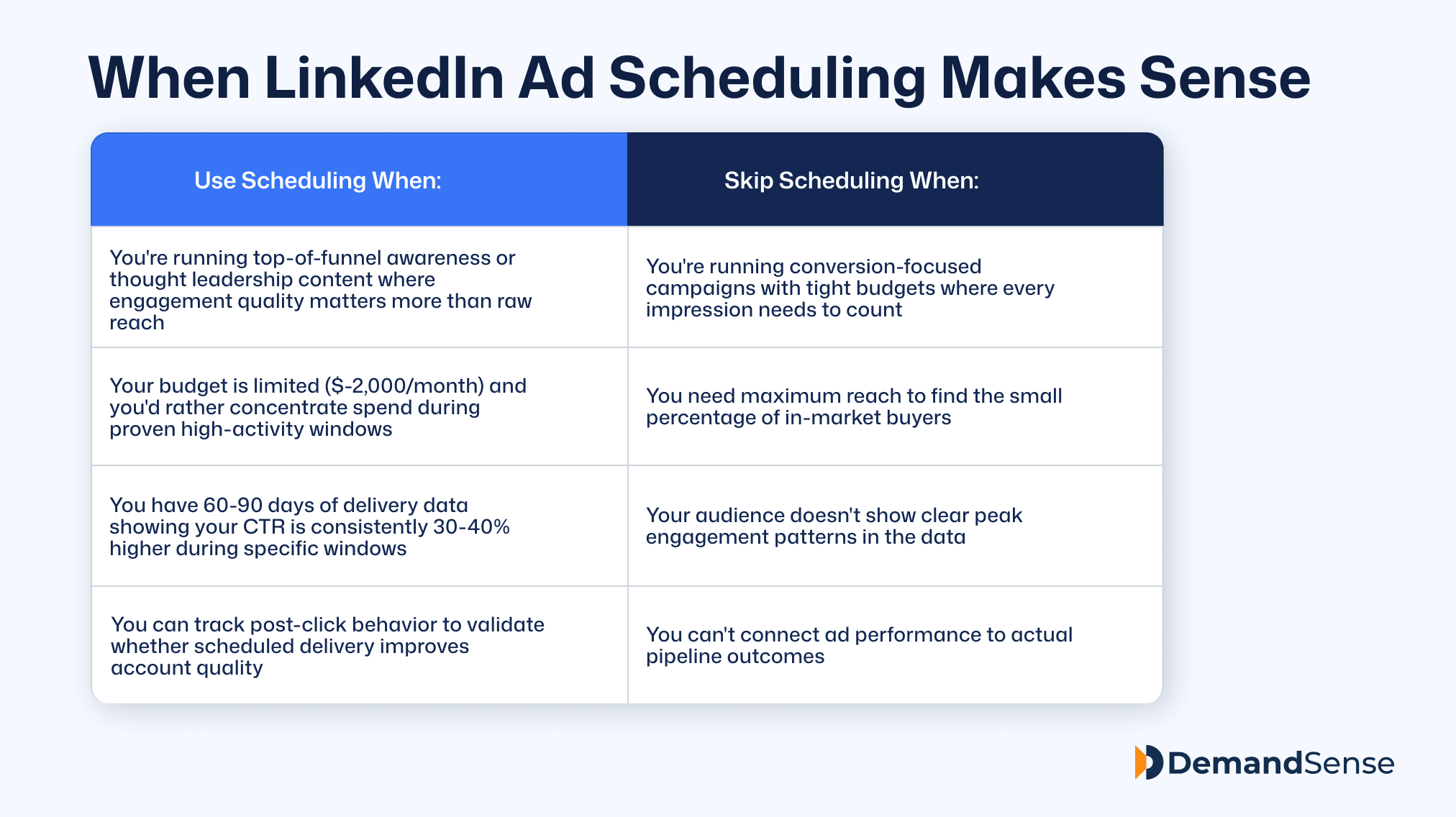
The critical factor: you need real data showing when your specific audience engages, not generic "best practices" about when B2B buyers are active.
Bottom Line
Manual bid scheduling consistently improved front-end efficiency in our tests. CTR up 26.6%. Engagements up 70%. CPC down 4.7%. Video completion rates are up across the board.
The trade-off is real—CPM goes up 20%, and you're competing in more crowded auction windows. But for top-of-funnel campaigns where engagement quality drives results, the data suggests it's worth testing.
The bigger lesson is what the test revealed about LinkedIn measurement in general:
Front-end metrics improved meaningfully, but we still couldn't tell which improvements drove business value.
That gap between a click and a customer is what most LinkedIn advertisers are missing.
Scheduling is one piece of the puzzle. Understanding what happens after the click is the piece that actually drives revenue.

![How to Use LinkedIn Sales Navigator Search Filters Like a Pro [2026 Guide]](https://cdn.prod.website-files.com/67160f781eeef22eaf34d58e/69ce69e4309170b938673cf6_LinkedIn%20Sales%20Navigator%20-%20Thumbnail.png)
