

.svg)


.svg)
Let’s be real: Knowing exactly who’s visiting your website, including names, companies, and job titles, feels like you’ve found that one missing piece of a jigsaw puzzle that puts your marketing together.
Now, you finally can…
What can you do, though?
An email doesn’t seem like a universal option anymore. Sometimes, it actually backfires.
Nobody wants to receive a "Hey, I saw you visited our pricing page" email from a company they were casually researching. It feels invasive. It kills trust before you even build it.
And how many times should they visit it before you even send such a message? One-time thing could’ve easily been a misclick or occasional curiosity.
Here's the thing: website visitor identification isn't just an excuse to add more people to your outbound list. It's an intelligence system that unlocks way smarter, less pushy ways to stay in front of prospects and move them through your funnel.
Don’t worry, this doesn’t mean your hands are tied. We just have a few better options in mind.
But first things first…
How do you know who your website visitors are?
Before we get into the nurture tactics, let's quickly cover the foundation: deanonymization.
Most website analytics tools (Looking at you, GA4) can tell you how many people visited your site, what pages they looked at, and how long they stayed. What they can't tell you is who those visitors actually are.
Website visitor identification tools work by matching IP addresses and digital signals from your website traffic to company and individual profile databases. When someone from a specific company visits your site, the tool identifies the organization (and often specific individuals within that organization) based on their network information and browsing behavior.
This means you can see:
- Which companies are visiting your site (company name, size, industry, location)
- Which individuals are engaging with your content (name, job title, LinkedIn profile, contact info)
- What they're interested in (which pages they viewed, how long they spent on your website)
- How engaged they are (visit frequency, pages per session, recency)
How do you set it up?
Usually, WebID means installing a tracking script on your website (similar to how you'd add Google Analytics, just a snippet of code in your site's header).
From there, the tool captures visitor data and matches it against business databases to identify companies and individuals.
If you're using something like DemandSense, the setup takes about 5 minutes. You add the tracking code to your site, and it starts capturing visitor data immediately. Here's how the install works if you want the technical walkthrough.
Advanced tools also track behavior and score intent. Instead of just a raw list of companies that visited, you get prioritized accounts based on actual engagement signals:
- which ones are coming back
- which pages they're spending time on
- which accounts matter most
And now, once you have this visibility, the real work begins: what do you actually do with it?
#1. Retarget Based on What Your Buyers Look For
Here’s a little “Fix your ad spend 101”: Don’t show the same generic ad to everyone who hits your website, regardless of what those people were actually looking at.
If someone spent 10 minutes on your case study about reducing LinkedIn ad costs, they're probably dealing with attribution challenges or budget pressure.
Retargeting them with a "Book a Demo" ad is... fine.
But retargeting them with a guide on "How to Prove LinkedIn ROI When Sales Cycles Are Long" is way more relevant.
How to do this:
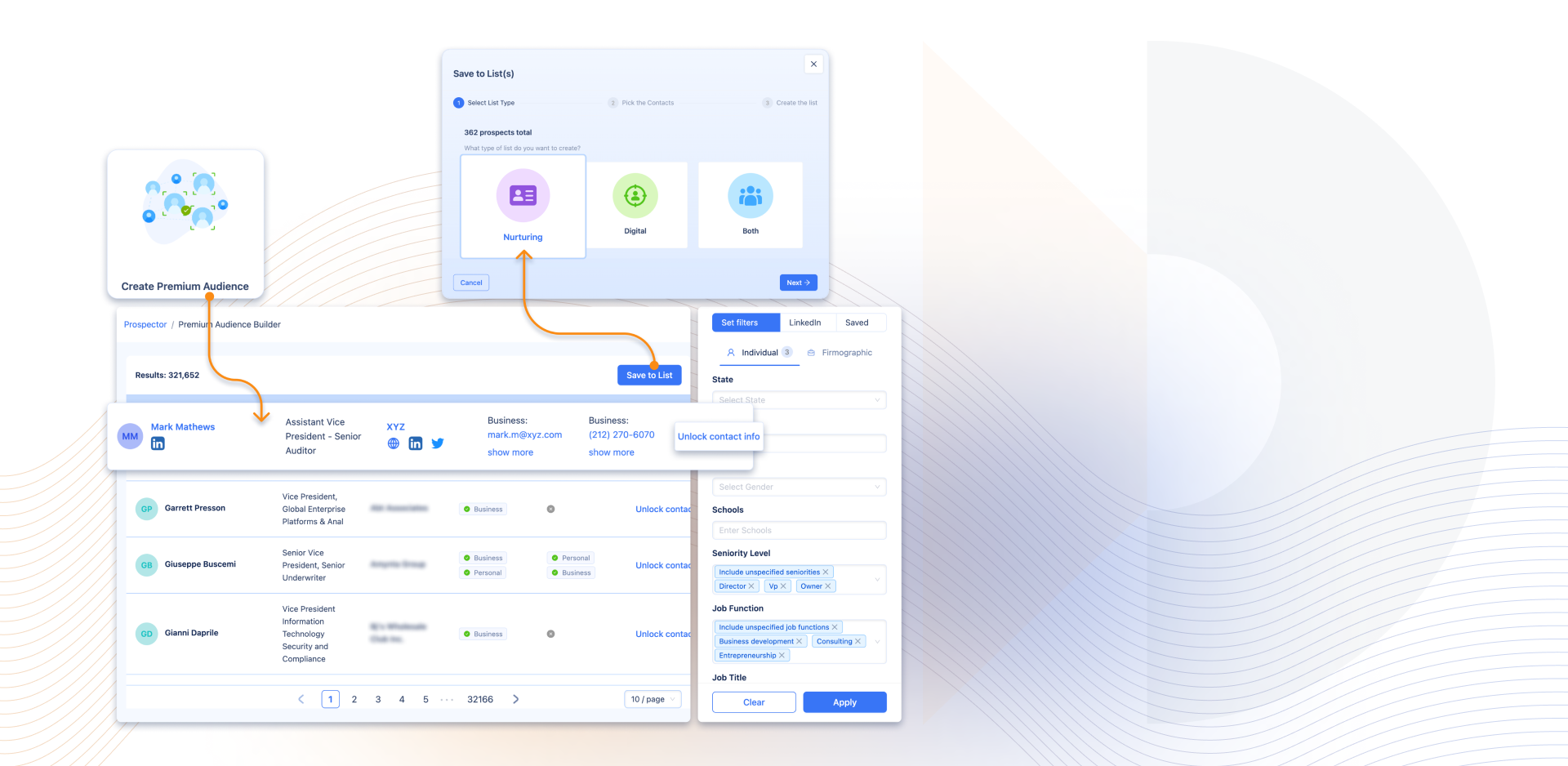
- Segment your identified visitors by the content they engaged with. If you're using DemandSense, you can create Lists based on page visits: one list for people who hit your pricing page, another for case study readers, another for feature page visitors. This makes it easy to organize visitors by demonstrated interest rather than lumping everyone together.
From there:
- Build LinkedIn or display retargeting audiences for each segment (you can export these lists directly)
- Serve content that matches their demonstrated interest, not just your homepage
This doesn't feel pushy because you're giving them more of what they already wanted, not interrupting them with a sales pitch.
#2. Score Accounts to Know Who Gets What Treatment
Not everyone who visits your site deserves the same level of attention.
Someone who looked at your pricing page three times this week? That's a different signal than someone who accidentally landed on a blog post and bounced in 10 seconds.
Lead scoring helps you figure out who gets what level of effort, but it’s important to do it right. Don’t assign arbitrary points (opened email = 5 points! downloaded whitepaper = 10 points!) without thinking about what actually indicates buying intent.
Here’s a better approach: score based on behavioral signals that show real interest.
What actually matters:
- Repeat visits - Are they coming back? How frequently?
- High-intent pages - Pricing, product demos, case studies, ROI calculators
- Time on site - Are they reading or just bouncing?
- Firmographic fit - Do they match your ICP (company size, industry, revenue)?
Use these signals to segment accounts into different treatment tiers:
- High-score accounts (hot): Sales-ready. Route to your team with context about what they viewed, when, and how often. These get personalized outreach.
- Medium-score accounts (warm): Engaged but not ready. Put them in a targeted nurture sequence - more educational content, case studies relevant to what they looked at, and invites to webinars.
- Low-score accounts (cold): Showed mild interest or don't fit your ICP. Keep them in general retargeting pools, but don't burn sales cycles chasing them.
#3. Find More People Looking Like Your Best Visitors
Taking your engaged website visitors and using them to find more people like them is a real gem that teams don't use that often (mostly because there's not enough data on your visitors).
If you know which companies and profiles are visiting your site and engaging with your content, you can use that data to improve your targeting on LinkedIn and other platforms.
How this works:
Analyze the patterns in your engaged visitors. What industries keep showing up? What company sizes? What job titles are most engaged?
Use this data to refine your cold targeting criteria. If most of your engaged visitors are Series B SaaS companies with 50-200 employees in financial services, build LinkedIn campaigns targeting companies with those exact characteristics.
If you're running LinkedIn ads, some tools let you optimize targeting in real-time based on who's actually engaging. DemandSense shows which LinkedIn prospects visit your site after seeing your ads, then lets you thumbs-up good fits (to find more like them) or thumbs-down poor fits (to exclude them automatically).
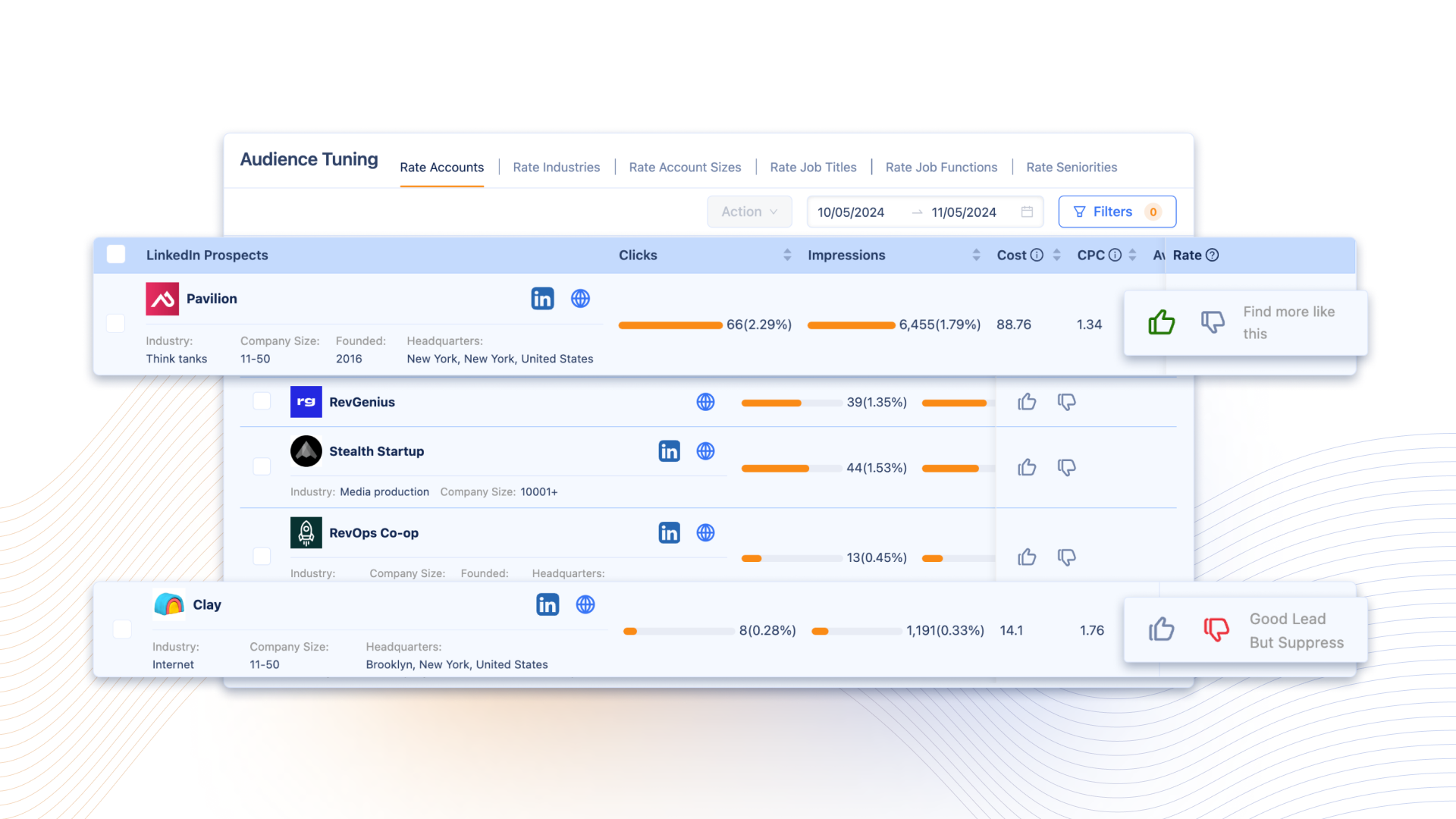
It's way smarter than broad targeting. You're finding companies that share traits with the ones already interested in what you do, which means they're statistically more likely to care.
And if the data doesn't match the type of visitors you want? Take a step back and optimize your messaging before the budget's all gone.
#4. If You’re Doing ABM, Trigger Account-Based Plays
The hard part about account-based marketing is knowing when to activate. You can't run personalized campaigns for every account on your list all the time. But when a high-value account starts engaging with your site? That's your cue.
What this looks like in practice:
- Set up alerts when target accounts visit your site (Slack notifications, CRM tasks, whatever your team actually uses)
- Activate coordinated touchpoints: sales outreach, personalized LinkedIn ads, direct mail, custom content
- Track whether that account moves through your funnel faster because of the coordinated effort
This isn't pushy because you're not randomly reaching out. You're meeting your ideal account where they are, without screaming, “We know you checked us out, it’s time to buy.”
#5. Update Your Content Based on What Your Buyer Wants
In the era of “dark social,” most content teams are flying blind. They publish blog posts, create resources, build landing pages, and then look at pageviews and time-on-page metrics that don't tell them who is engaging.
When you can see which companies and job titles are consuming your content, you can answer way better questions:
Questions you can actually answer:
- Are the right people (your ICP) engaging with our content, or are we attracting the wrong audience?
- Which topics resonate most with director-level contacts vs. VPs vs. individual contributors?
- What content drives visitors from high-intent accounts to pricing pages?
- Which blog posts are performing well with our target industries?
Use this data to double down on what's working and kill what's not. The goal here is refining your content strategy based on who's actually engaging, not just pageview counts.
#6. Make Your Outbound Warmer
Okay, so we said this isn't about follow-up emails.
But let's be real: sometimes you do need to reach out. The difference is how you do it.
If someone from a target account visited your site, you now have context. And that’s why you're referencing something real.
The wrong way: "Hi [Name], I saw you visited our website. Want to chat?"
The better way: "Hi [Name], noticed your team's been researching [topic they engaged with]. We've helped similar companies in [their industry] solve [specific challenge]. Here's a resource that might be helpful: [relevant content]. Happy to chat if useful."
TL;DR: Acknowledge the visit without being creepy about it.
You're adding value first (sending them something useful) before asking for anything. And you're personalizing based on their actual behavior, not just their job title.
This still counts as outbound, but it's informed outbound. You're reaching out because they've already shown interest, and it beats spraying & praying by a mile.
Wrapping Up…
Website visitor identification gives you visibility. What you do with that visibility is what matters.
You can treat it like a lead gen tool and blast everyone who visits your site with follow-up emails.
Or you can treat it like an audience intelligence system: the one that helps you retarget smarter, prioritize better, find lookalike audiences, coordinate ABM plays, refine your content, and personalize outbound when it makes sense.
The latter builds trust. The former... kinda doesn't.
We’re marketers. We know you will follow up. And the truth is, you can. But there are way better plays to play it out.
Especially when you know your audience that well.

![How to Use LinkedIn Sales Navigator Search Filters Like a Pro [2026 Guide]](https://cdn.prod.website-files.com/67160f781eeef22eaf34d58e/69ce69e4309170b938673cf6_LinkedIn%20Sales%20Navigator%20-%20Thumbnail.png)
