.svg)


.svg)

You might be losing money on LinkedIn ads because of the settings that Campaign Manager doesn't give you.
LinkedIn Campaign Manager gives you a start date, an end date, and a daily budget. That is basically it when it comes to delivery control. Everything else, including when your ads run, how often the same person sees them, and how your budget moves across campaign stages, the platform decides for you.
For B2B advertisers with real spend behind their campaigns, that's a problem.
The average CPC for LinkedIn Ads runs $8–$10 in the US, or $6–$7 globally. Agreed, part of that cost is targeting, but there's also a part due to delivery inefficiency, the platform doesn't give you tools to fix. No matter how much ROI you are getting with your LinkedIn ads right now, you can get more with access to settings that address these delivery inefficiencies.
Here is how relying on LinkedIn's native setup alone is burning a hole in your ad budget, and the settings that actually move the needle and can help you get the best ROI on ad spend.
#1 Ad Scheduling (Day and Time Control)
When you set up your ads, LinkedIn gives you a start date, an end date, and a timezone schedule, and that's it. No further flexibility.
It does not take into account the fact that fewer people are online in the middle of the night, and your ads keep running, same with your money.
For instance, for US-targeted campaigns, LinkedIn resets daily budgets at midnight UTC, and a chunk of spend fires between midnight and 8am Eastern when no B2B buyers are active. For a deeper breakdown of how timezone resets affect delivery, see our guide on LinkedIn ads and time zones.
Also, engagements are lower on weekends. You cannot compare a Sunday morning to a Tuesday morning ad engagement.
When it comes to ad scheduling? The LinkedIn native setup has limited flexibility.
The setting that actually moves the needle? Dayparting: concentrating delivery on business hours, Tue–Thu, when your ICP is actually on the platform.
This isn't a minor tweak — it is the elimination of budget spent on zero-intent impressions that you can stop with the right controls.
We ran an experiment focusing on ad delivery during peak engagement windows, and the results spoke for themselves: CTR jumped from 1.58% to 2%, CPC dropped from $5.49 to $5.23, and engagement increased by 70%.
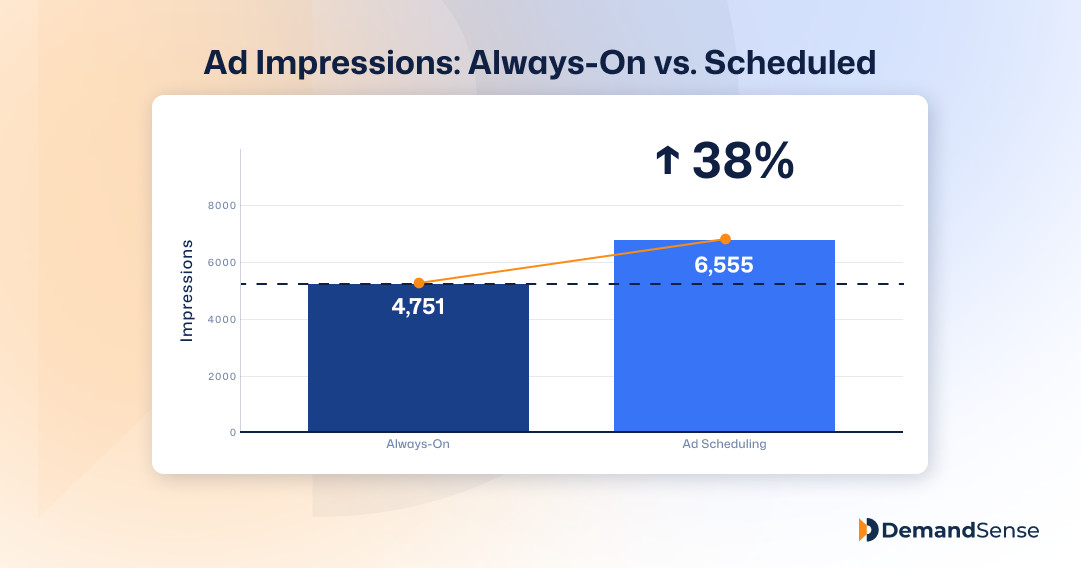
But you might say, "I can manually turn on and off my ads." It does not exactly work that way; there are common scheduling mistakes one can make.
For instance, scheduling ads based on your timeline rather than your audience's, cutting weekends but leaving nights on, or even scheduling top-of-funnel ads the same way you would a bottom-of-funnel ad.
With a tool like DemandSense with granular day/time scheduling, you are not manually toggling campaigns every night and every Friday. You are also reaching the right people at the right time, resulting in the best returns.
#2 Frequency Capping
When the same person sees your ad 8–10 times with no action, they experience ad fatigue, and continued spending on that impression is a waste.
They stop clicking, liking, and interacting with it. Over time, CTR drops, and CPL ultimately increases when your audience is unresponsive.
Apart from wasted ad spend, showing the same ad to a person multiple times can negatively affect your brand reputation in B2B. Overexposure can annoy prospects and make them see your brand as pushy or spamming. Frequency capping not only saves you money, but it also preserves your brand reputation.
The general rule of thumb: below 5 impressions per member per month is low frequency, 6–10 is optimal, and 11+ is when ad fatigue starts to set in and engagement declines.
LinkedIn introduced native frequency cap management in July 2025, allowing advertisers to set limits of 3–30 impressions per member within seven-day periods — but only for brand awareness campaigns. Frequency capping goes beyond the brand awareness objective campaigns the platform has made available so far.
Worth noting: without proper frequency controls, roughly 80% of ad impressions end up served to just 10% of your target audience, meaning some accounts get hammered while most of your list barely sees you.
The frequency cap setting that actually moves the needle is one that automatically stops showing ads to non-converting accounts and redirects spend to fresh, high-potency accounts. With this setting, DemandSense users average 0.875% CTR compared to LinkedIn's 0.52% industry benchmark, a whopping 35% gap.
Better frequency management, i.e., showing ads to the right people the right number of times, is part of what drives that difference.
#3 Audience-Based Delivery Triggers (Website Visitor Retargeting)
Matched audiences and LinkedIn pixel-based retargeting are two methods of LinkedIn ad retargeting, but neither lets you prioritize active buying signals, such as pricing page visits and multiple site returns.
LinkedIn treats all retargeting audiences the same way. Whether someone spends 10 minutes on your pricing page or bounces from your homepage in 8 seconds, LinkedIn's native setup cannot distinguish, which is a missed opportunity to classify your audiences into different categories and retarget them appropriately.
With DemandSense's website visitor identification, you can take things a notch higher. You get insight into who viewed your website, which pages they viewed, and how engaged they were.
Every website visitor is also recorded, scored based on intent signals and ICP fit, and then grouped into three audiences for you.
There is a high-intent audience your sales team can follow up on directly, a mid-intent audience your marketing team can nurture and pass along to your sales team later, and a low-intent audience that needs more awareness campaigns.
#4 Conversion Tracking (Beyond the Platform)
When it comes to tracking conversions, LinkedIn only gives you access to LinkedIn Insight Tag conversions, Lead Gen Form submissions, and basic click attribution with a fixed attribution window. But this native setup isn't enough to get the best out of your conversion tracking.
First is the click attribution with a fixed attribution window. LinkedIn's default conversion windows max out at 30 days for post-click and 7 days for view-through conversions. But B2B buying cycles are usually much longer. Dreamdata's research puts the average B2B customer journey at 211 days from first touch to closed-won revenue — with LinkedIn ad impressions averaging 320 days from first impression to revenue.
Someone who sees your ad in January and converts in March won't get attributed. Campaigns that kicked off sales cycles closing months later may get paused because LinkedIn doesn't connect those dots.
Secondly, native LinkedIn lead gen forms have an average CPL of $810.83 compared to that of external conversions with a CPL of $221.14 (3.7x lower).
But what actually matters is the SQL conversion rate, pipeline velocity, and closed revenue you get when you combine the native LinkedIn forms with a setting that lets you see accounts that checked your ads or visited your website.
You get these people grouped by intent signals, and ICP fit into low-, mid-, and high-intent audiences. You are not shooting blindly; you see the actual accounts, and your sales team can take it from there to turn this insight into revenue, making your nurturing strategy more efficient than simple follow-ups.
Wrapping Up…
LinkedIn is one of the best platforms for B2B lead generation. However, the low-control campaign infrastructure is where budgets disappear.
The marketers closing that gap aren't spending more; they're spending smarter because they have controls that the platform does not natively provide.
See how you compare from our 2025 Benchmark Report here.

![How to Use LinkedIn Sales Navigator Search Filters Like a Pro [2026 Guide]](https://cdn.prod.website-files.com/67160f781eeef22eaf34d58e/69ce69e4309170b938673cf6_LinkedIn%20Sales%20Navigator%20-%20Thumbnail.png)